Home Blog Page 2105

Berkeley Protests: Cop Attacks Cindy Pincus In The Head With A Baton

4

Written by: Vandita 


Cindy Pincus, the 29-yr-old minister at First Unitarian Universalist Society in San Francisco,  was helping a fallen protester during the Berkeley protests early this month over police killings of Michael Brown, Eric Duncan, Tamir Rice, and many others when she was attacked in the head from behind by a cop with his baton.

Cindy was hospitalized after the attack and the Huffington Post reports that it took three staples to seal the gash in her head. The blow to her skull caused a gaping head wound and a concussion.  “I had a brief blackout in my vision. I saw stars,” said Cindy. “I would say it’s an indiscriminate and disproportionate reaction to peaceful protests. It was completely way out of line”.

Video footages show that police has been initiating violence to provoke the peaceful protesters to intimidate the other protesters, paralyzing them with fear and anger. The protesters are left with no choice but to go on fight-or-flight mode and defend themselves.  This tactic works for police because most of the time the protesters can’t defend themselves from a cop’s weapon and therefore he is charged for causing commotion, rampage and violence and put behind bars. Check out this video in which police randomly attacked a peaceful senior citizen…

The reality is riot cops are trained to engage in taunting — actions whereby they intentionally attack protesters – to provoke a protester into defending him or herself. The above incidents prove that a peaceful protester is more likely to be attacked by cops, given how police are trained. The more peaceful a protester is, the more vulnerable he is as target for police violence.

Here’s the video in which Berkeley police is intentionally attacking the most peaceful protesters…

Looking at what happened to Cindy and what happens to most peaceful protesters, Malcolm X’s statement – it is criminal to teach a man to not defend himself when he is the constant victim of brutal attacks – does ring true.

______________________________________________________________________

Source:

http://filmingcops.com/christian-ministers-head-split-open-bludgeoned-by-swarm-of-cops/


An Android App for Code Breaking?

6


That’s right! Step right up and be one of the ones to do those things you always wanted to do when you were that age! Be warned! This message may self-destruct in 5 seconds!

It’s been glamorized, idolized, fantasized and been used in everyday life in some cases. It’s saved lives, and taken them. It’s given direction, riddle and plain old confusion. Now, it seems to have become an electronic toy. Cryptography, code breaking, de-ciphering; there’s many names for it. How many kids dreamt of being a secret agent at one point or another? The attraction and curiosity were so great at times during the cold war and the advent of radio shows that companies often would reveal secret messages over the airwaves that you could not even attempt to read without the official “decoder ring”. The key to all knowledge! It’s a shame that all of that enthusiasm and childhood excitement appears to have faded away in recent times…only to be replaced by smart phones, gps watches and other super electronical stuff.

December 12, 2014. A trans-generational bridge now appears to us from the United Kingdom’s Government Communication headquarters (GCHQ). These folks are the agency responsible for providing signals intelligence and information assurance to the British government and armed forces.  Who better to launch out an early search for the next savvy yet underage cryptography icon than a government intelligence agency right?

Introducing… Cryptoy.

“a fun, free, educational app about cryptography, designed by GCHQ for use by secondary school students and their teachers.”* or anyone else who wants to dabble in the realms of secret code!

cryptoy_1

Designed by student interns on placement at GCHQ, it was created as part of a project to demonstrate encryption techniques at the Cheltenham Science Festival. Since being introduced it has become a hit amongst both teacher and student hence the decision to make it available to the general public with this basic description:

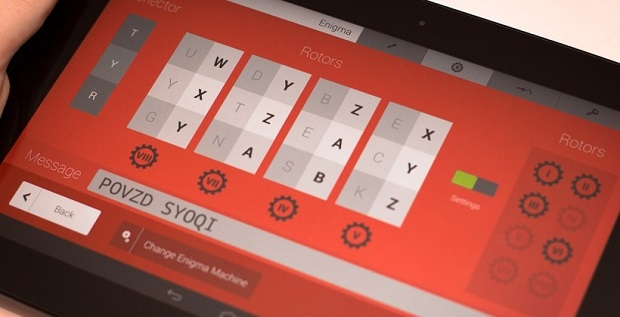
“The app enables users to understand basic encryption techniques, learn about their history and then have a go at creating their own encoded messages. These can then be shared with friends via social media or more traditional means and the recipients can use the app to try to decipher the messages.”*

In a nutshell, the app shows and teaches basic examples of cryptography in a colorful and interactive way, in hopes of paving a pathway to an even greater development of mathematic and cyber skills. It almost resembles a science fiction movie plot if you’d like to take that leap. An 8 year old whiz kid with an affinity for puzzles challenges, defeats and improves on the app because it bores him only to have the focus of the “‘eye in the sky” turned his way. Whisked away to a fully funded educational facility he’s not only taught but, twisted and bent without even knowing until becoming… that guy with the horn rimmed glasses whose mind moves so fast he doesn’t even know he’s breaking code anymore. Thank you Hollywood and welcome to the rabbit hole.

All kidding aside, congrats to GCHQ for coming up with this. Any way we can get children interested in our future is a plus in this book. Mind bending puzzles for the modern age? A definite winner.

As of right now the App is only available for Android tablets, A version for IPads is due to be released sometime in 2015

__________________________________________________________________________

Source: 

http://www.gchq.gov.uk/press_and_media/news_and_features/Pages/cryptoy-app-released.aspx


Illegal Spy Gear Found in Oslo’s Government District

0

Written by: TechAnon


Tis the season! …for more snooping and spying!

We watch them, they watch us, the others watch the first ones… we already know that there’s no such thing as security anymore but isn’t this starting to get ridiculous? Finally, after tips and a few months of private investigating, the Norwegian “Aftenposten” news has reported findings (and a generalized map) of a high quality network of surveillance equipment structured to gather intelligence right in the middle of Oslo’s government district. This corner of the world doesn’t typically hear much about countries like Norway, Sweden, Holland and the like. They don’t normally stick their noses into everyone else’s business and are generally left alone. There is also the simple possibility that this same corner is just underexposed to that part of the world too. None the less, it’s not a big surprise to hear they deal with the same “NSA style” crap that the USA (and the rest of world for that matter) has come to know as status quo.

Who exactly is being looked at?

“The Prime minister’s office, the Ministry of defense, Stortinget (parliament) and the central bank, Norges Bank. Ministers, state secretaries, members of parliament, state officials, business executives and other essential staff engaged in protecting the nation’s security, our military and our oil wealth – totaling more than 6000 billion Krone (about 92 billion dollars) – are working within this area.”*

Once initial suspicions were confirmed, the Aeger Group and CEPIA Technologies were requested by Aftenposten to attempt to map areas of “suspicious cellular activity”. Once cut loose, these agencies promptly located not one, but an assortment of areas within Oslo that contained illegal monitoring equipment disguised as “base stations” or cell network antennae as many others would recognize. Once accessed these fake base stations would capture all registered cell phones within reach. As you can imagine, this is no cheap electronic store doo-dad. This is the type of equipment that is not allowed to be sold to a private party within NATO. Well….legally. At a running estimate this network could be anywhere from $80,000 to $300,000 according to Aeger but, if there are that many systems up and running…who knows how far this could reach.

Who’s responsible? Who knows? The only way to figure that part out is to actually get hands on access to the equipment and do mapping inside buildings and (cough cough) only the police and security agencies can do that. Guess what? They’re not talking.  As a point of reference, only the police, the Police Security Service (PST) and the National Security Authority (NSM) have the legal right to use such equipment within the country but, any public official that has been contacted about the matter has denied their agency owning or operating such equipment.

When approached by Aftenposten with their report in hand, “the Ministry of justice did not want to make an immediate comment on the matter”. However, the next morning there was a mysterious influx of staff from the National Security Authority to the streets of Oslo appearing to try to trace the illegal base stations.

Is it coincidence that Norway also has an agency name that translates into English as “NSA”? or is it just funny? Are they actually investigating or is it a “Dog and Pony show” to appease the masses? Since Aftenposten had to perform their own investigating before anyone else took things seriously, who would like to take a W.A.G. (Wild A** Guess) at who may be peeking at whom? Where will it happen next? Stay tuned for our next episode.

____________________________________________________________________________

Sources:

http://www.techworm.net/2014/12/spying-equipments-discovered-outside-norway-parliament-prime-minister-residence.html

http://sputniknews.com/europe/20141213/1015809344.html

*http://mm.aftenposten.no/stortinget-og-statsministeren-overvakes/


The Top FREE Computer Programs Everyone Should Have          

37

Written by: TechAnon


“Free is for me!” it sounds great but is it always a good idea? You may get exactly what you pay for.

Sometimes, in a land far away, Anonymous citizens of such a society actually do provide free things for the betterment of our world. In the age of digital data some of it just happens to be handy dandy programming for your home personal computer or PC to shorten it up a bit. Granted, many pre-built PC’s already arrive with certain software installed for virus protection, music and video, backups and more. Yes, it’s usually convenient to keep these tools installed because they’re already there. Right? It’s worth the extra money…right? That may not always be the case. There ARE inexpensive and sometimes completely FREE programs out there for different tasks that are rated just as good (if not better in certain instances) than the fancy logo and big name developers.

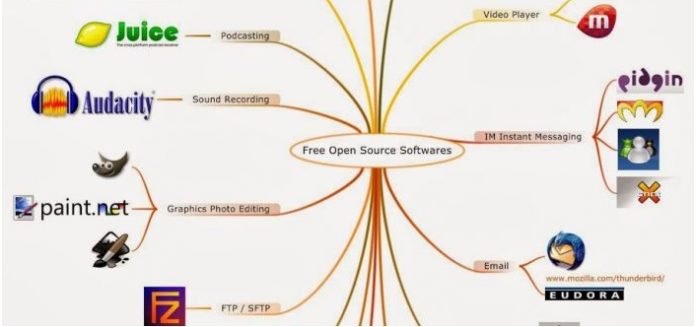
After a little bit of research and a bit of input by Technotification* a few of these programs are listed by application below. No, it’s not our place to decide what is best for you and what you need. Generally speaking, the list below seems pretty much on the “up and up”. Check it out.


1. Antivirus and malware.

It’s pretty obvious what these cover. Like the giants of antivirus both ‘avast” and “AVG” not only provide you with a free app but, also follow up with free updates for virus protection.


For Malware and Spy ware, “Malwarebytes” is the recommended choice


2. Backup solutions

There’s a plethora of ways to back up your precious pictures, tunes and whatnot. Even your operating system has it’s funny such way. Unfortunately, most of these involve everything being stored locally. i.e. a designated space on your internal disk, an external hard drive or for some.. a plain old thumb drive (since their capacity has grown so). What happens in the case of a disaster? You get robbed? You are told to evacuate for any reason?


“Dropbox” will give you 2GB absolutely free and up to 1 terrabyte for 9.99 usd per month

“Mozy” will give you 50gb for 5.99usd and some free months depending which plan you choose.

Both have their pros and cons but, once again, you decide for you.


3. Browsers

Yes, the war of the browsers. Just because Microsoft comes with almost everything doesn’t mean it always works the best. Both Mozilla Firefox and Google Chrome work with an endless number of websites and in certain cases? Better than I.E.


4. File Compression

Large pictures, giant media files and maybe even “scratch and sniff” are being whipped around the networks at lightning speed due to being able to ‘compress” them. Sure “winzip” works great but, have you seen the price?

Check out “7-zip.org”. it’s completely free and available for 79 different languages.  They do ask for a donation but, it’s just that. It’s not a ‘fee”.


5. Disc ripping and creation

Taking the data from a CD or creating a dvd/cd can be done relatively easily by popping the disc right into your disc tray.

CDburnerxp.se offers cdburnerxp for free and also boasts to be able to burn Blue Ray and HD dsics


6. Email

Maybe you have one of those archaic email systems like outlook or Aol. “You’ve got mail” has nothing on the here and now of our world.

The top recommendations here would be:

Mozilla Thunderbird as an email client

Gmail as an online email system.


7. FTP, SFTP and SSH Utilities

Who for wha?… Huh? It’s ok. Those of you that maintain a web page or have the need to process data to and from a server will be  familiar with these. Although there are plenty of commercial programs you can purchase to do all of this, these two animals are said to be better than most of them


FTP client: “Filezilla” is a completely open source program that is “distributed in the hope that it will be useful”

SSH client: “Putty “ is also a completely open source utility said to work as well as the big boys.


8. Image editing, paint and pictures

Once again, an area where there massive amounts of programming out there. Some costing hundreds of dollars and even more charging a license or subscription rate per year. The ones below are…free and seemingly reliable.


Image editor: GIMP.org


Paint program: Paint.net is free image and photo editing software for PCs that run Windows


Picture organizer: google picasa to organize, edit and share photos


9. Multimedia

Here’s another big one. Everyone wants to be top dog in the new and exciting age of media. If you have the cash to part with you can spend hundreds. Otherwise? Here’s two happy little players.


“Audacity” can play, record and modify sounds in windows, MAC and even linux. Free for the download

“VLC”  is a free player that boasts the ability “to play most multimedia files as well as DVDs, Audio CDs, VCDs, and various streaming protocols”


10. Office suite

Another area typically dominated by Microsoft and their license fees when a program called;

Apache’s “Openoffice” is out there at no charge.


There you have it. Computing on a budget. Not all may work for what you need. Call it a jump in the right direction of finding what works for you. If you have used any of the products listed above or have found something you believe is better tell us about it. Sometimes a simple review can help 100 people. There’s always someone who knows more and there’s always someone who wants to learn more.

_________________________________________________________________

Source:

http://www.technotification.com/2014/03/top-free-pc-programs-everyone-should.html

Is This Coincidence? Need To Watch!

4

If you have ever had any doubt about the media and what they circulate: that you have perhaps heard it all before, but can’t quite pin point it…don’t worry. You’re not going mad and you’re not hearing things. Since the concept of journalism began, governments have liked to control some of the processes that go into reporting. Be it in Western ‘democracy’ or Socialist nations, the concept of free thinking terrifies those in higher power.

Here is a ludicrous, but true snap shot of the current situation below. And then make your own mind up. How does the media present to you now?

It is a fact that most news outlets buy their news from AP (the Associated Press). And this fact should make you think about their power and influence.